

While freelancers fight over $15/hour gigs on Upwork, the LinkedIn Services Marketplace sits largely underused — by both clients and freelancers. It connects your service listing directly to your professional profile, your work history, and your network’s endorsements. The LinkedIn Services Marketplace isn’t a separate platform you have to build from scratch. If you have a LinkedIn profile, you’re already 80% set up. The question is whether you’ve actually activated it to work for you.
Why Most Freelancers Ignore LinkedIn’s Best Client-Finding Feature
Most people treat LinkedIn like a job board — post a profile, wait to get recruited, maybe post an article occasionally. That’s not how the platform’s Services feature works.
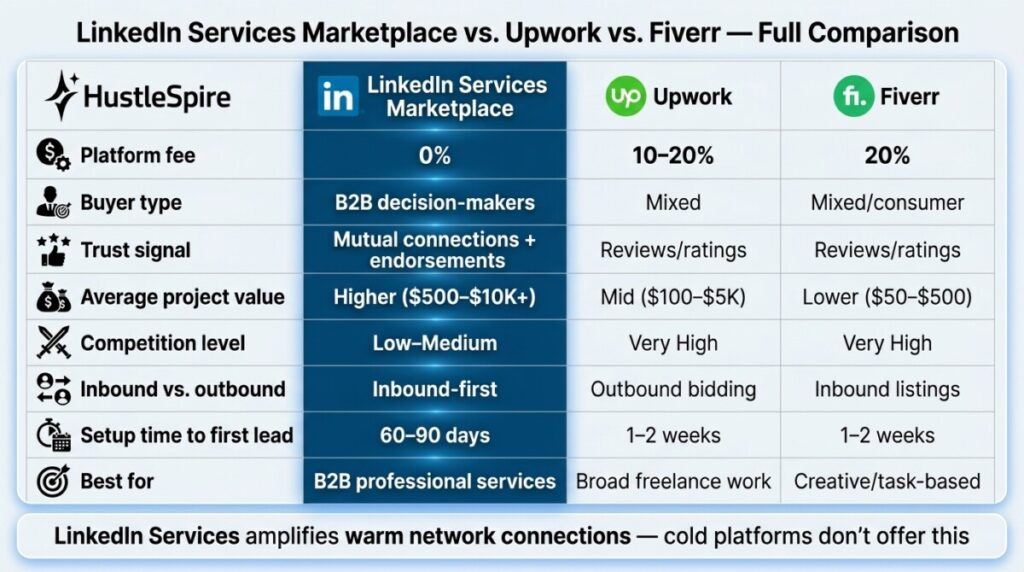
The Services Marketplace operates more like an inbound lead engine. When someone in your network — or someone connected to your network — searches for a service you offer, your listing surfaces with social proof already attached: mutual connections, endorsements, shared employers. That trust layer doesn’t exist on Upwork or Fiverr, where you’re a stranger competing on price. However, most freelancers have never even turned the feature on, let alone optimized it. They’re leaving a warm-lead pipeline completely dormant.
Additionally, LinkedIn’s 950+ million user base skews heavily toward business decision-makers — exactly the buyers willing to pay professional rates for quality work.
How to Set Up and Win on the LinkedIn Services Marketplace
Step 1: Activate your Services page and treat it like a landing page, not a form.
Go to your LinkedIn profile, click “Open to” → “Providing Services.” You’ll select up to 10 service categories — be specific. “Content Writing” is too broad. “SaaS Content Marketing” or “B2B Email Copywriting” tells a potential client exactly what they’re getting. Your service description gets 500 characters — use every one. Lead with the outcome you deliver, not your credentials. “I help SaaS companies reduce churn through onboarding email sequences” outperforms “Experienced copywriter with 5 years in tech” every single time.
Step 2: Leverage your existing network before chasing cold leads.
The LinkedIn Services Marketplace amplifies warm connections first. Your first move after activating the feature should be posting one piece of genuinely useful content — a tip, a short case study, a mistake you helped a client avoid — and then asking 3–5 connections who know your work to endorse your service listing. Each endorsement increases how prominently your listing appears in searches. One consultant I know went from zero to four qualified inbound inquiries in her first two weeks, purely by posting two short LinkedIn articles and asking existing colleagues for endorsements. No cold outreach required.
Many freelancers first discover hidden opportunities by exploring overlooked services in the gig economy. A good example is explained in The Fiverr Gigs Nobody’s Selling (But Buyers Are Desperately Searching For).

Step 3: Price for the platform’s buyer psychology — not Upwork’s.
LinkedIn buyers are not shopping for the cheapest option. They’re typically mid-level managers or founders making purchasing decisions with budget authority. Pricing your services 20–40% above what you’d charge on Upwork is not only defensible — it’s expected. A LinkedIn buyer who finds you through a mutual connection and sees 15 endorsements is pre-sold before they contact you. Your rate signals quality. Freelancers who optimize their freelance pricing strategy for platform context consistently outperform those who use the same rate card everywhere.
Step 4: Respond to inquiries within 2 hours during business hours.
LinkedIn tracks your response rate and displays it on your service listing. A “Responds within 24 hours” badge beats “Responds within a few days” in buyer confidence — particularly when the client is also browsing three other service providers simultaneously. Set a mobile notification for LinkedIn messages and treat initial inquiries like a warm sales call, not a casual DM. Speed signals professionalism in a way that no amount of profile polish can replace. If you’re managing multiple freelance client pipelines, build the response habit into your daily workflow before scaling your listing visibility.
LinkedIn Services Has Real Limitations
The LinkedIn Services Marketplace works best for service categories that the platform’s user base actually buys: B2B content, marketing strategy, consulting, coaching, design, and tech services. It’s a poor fit for highly creative consumer work, physical trades, or anything outside the professional services space.
Volume is also lower than Upwork or Fiverr — you might receive 2–5 qualified inquiries per month in the early stages rather than 20. The trade-off is that those 2–5 inquiries are pre-qualified, higher-budget, and far more likely to close. Expect 60–90 days to build enough profile activity and endorsements to see consistent inbound traffic. This isn’t a same-week income solution.

Activate the Feature Before Someone Else In Your Network Does
Open LinkedIn right now and check whether your Services page is active — most people reading this haven’t turned it on yet. Activate it, select your three most specific service categories, write a 500-character description that leads with client outcomes, and message two people who know your work, asking for an endorsement. That’s a 20-minute setup for a lead channel that compounds over time. If you want a comparison of where LinkedIn Services fits against other freelance platform options for side hustlers, that context is worth having before you decide where to focus your outreach energy.
There are also lesser-known places online where beginners can land surprisingly well-paid work. One of those opportunities is discussed in The Remote OK Job Board Secret: Landing $50/Hour Gigs Without Experience.
