

Most freelancers think slow client responses are about timing—send emails on Tuesday mornings, avoid Fridays, and use the right subject line. That’s all noise. The real problem is that you’re sending emails blind, with zero data on whether they’re being opened, clicked, or ignored entirely. Email tracking for freelancers isn’t a luxury feature—it’s the feedback loop that tells you whether your outreach is working before you spend another week following up on silence.
Why Freelancers Keep Getting Ghosted (It’s Not What You Think)
The instinct when clients go quiet is to write better emails. Better subject lines, shorter copy, more compelling offers. That’s treating the symptom, not the diagnosis.
If you don’t know whether your email was opened, you can’t distinguish between “they read it and weren’t interested” and “it landed in spam and they never saw it.” Those two problems require completely different solutions. Rewriting a perfectly good email that was never opened is wasted effort — and most freelancers do exactly that, week after week.
The fix isn’t more creative copy. It’s better data.
It also works hand-in-hand with profile optimization strategies like those explained in The Upwork Profile Hack That Tripled My Response Rate (Copy This Framework), where better positioning leads to more replies and more work.
The Email Tracking Tools That Actually Move the Needle
Point 1: Start with Mailtrack — free, effective, and takes 90 seconds to set up.
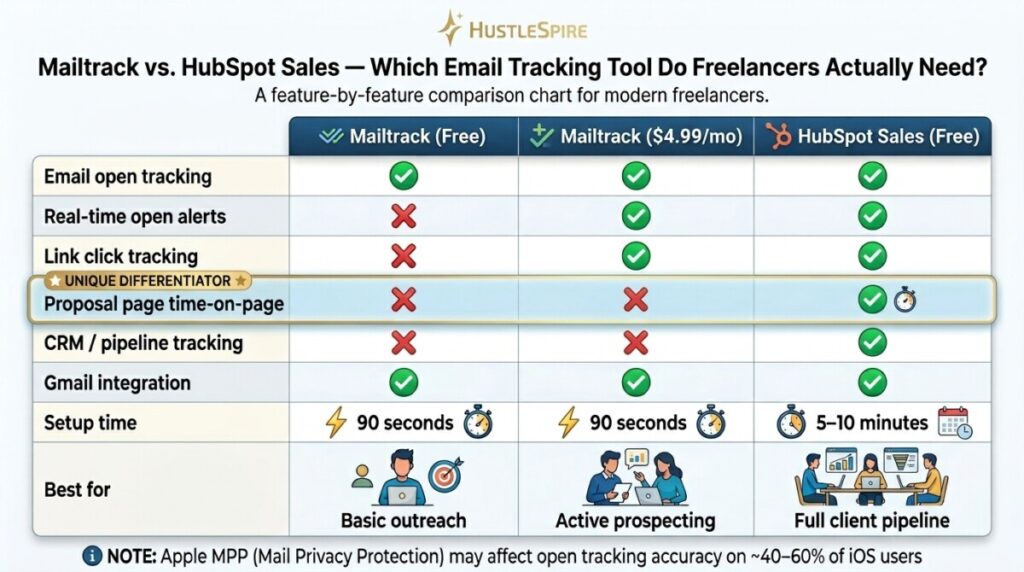
Mailtrack integrates directly with Gmail and adds read receipts to every email you send. The free plan shows you when emails are opened and how many times. At $4.99/month (Individual plan), you get link click tracking, daily email digests, and real-time notifications. For freelancers sending 20–50 outreach emails per week, this information is operationally significant. One copywriter I know stopped following up on emails opened 4+ times with no reply — and started calling those clients instead. His conversion rate on that subset jumped from 8% to 31%.
Point 2: For proposal-level tracking, upgrade to a tool built for sales workflows.
HubSpot Sales (free tier available) goes beyond open tracking — it shows you which links inside your email were clicked, how long someone spent on your proposal page, and sends a desktop notification the moment they open it. That real-time alert is the feature that changes behavior. When you know a prospect just opened your $3,000 proposal, you follow up within 20 minutes while you’re top of mind — not three days later when they’ve moved on. HubSpot’s free CRM also lets you log calls and track your entire client pipeline, which helps if you’re managing multiple freelance clients simultaneously.

Point 3: Use open data to fix your subject lines — not your email body.
Most response rate problems live in the subject line, not the content. If your open rate sits below 30%, the email body doesn’t matter—nobody’s reading it. Track opens for two weeks across your outreach emails. Subject lines pulling above 40% open rates are working; below 20% need replacing. Specific, personal subject lines consistently outperform clever ones. “Quick question about your [website/brand/project]” outperforms “Exciting collaboration opportunity” by roughly 2–3x in open rates, based on widely reported A/B test data from tools like Mailchimp and HubSpot.
Point 4: Build a simple follow-up sequence triggered by tracking data.
Day 1: Send initial email. Day 3: If opened but no reply → send a short follow-up referencing a specific detail from your original pitch. Day 7: If unopened → resend with a different subject line. Day 14: Final bump with a direct question (“Is this still on your radar?”). This sequence, informed by real open data, is how freelancers running efficient outreach systems consistently maintain 50–70% response rates on warm leads.
Improving how you communicate with clients can unlock more opportunities online. That same principle connects closely with The AI Money Method That’s Working Right Now (Before Everyone Catches On), where smarter tools are helping freelancers move faster.
Tracking Tools Have Limits
Email tracking isn’t perfect. Apple’s Mail Privacy Protection (introduced in iOS 15) pre-loads email content—including tracking pixels—which means some “opens” you see are false positives from Apple devices. Estimates suggest 40–60% of email users now have some form of open tracking protection enabled.
That doesn’t make tracking useless — it makes it directional rather than precise. Use open data as a signal, not a certainty. And be aware that in some regions, disclosing email tracking to recipients may be a legal consideration under GDPR. If you’re emailing EU-based clients, check your compliance posture before adding tracking to cold outreach.

Install Mailtrack
Download Mailtrack’s free Gmail extension today—it installs in under two minutes and requires no technical setup. Send your next five client emails with tracking enabled. Before you write a single follow-up, check what the data shows. If emails are being opened multiple times with no reply, your job is to lower the friction to respond, not to rewrite your pitch. If they’re not being opened at all, your subject line is the problem. Let the data tell you which battle you’re actually fighting—then you can choose the right productivity tools to win it.
