

Ask most side hustlers where their time goes, and they’ll give you a vague answer—”working on the business,” “doing content stuff,” or “client work.” That vagueness is the problem. A weekly time audit isn’t a productivity trend. It’s a diagnostic tool that shows you exactly which activities are generating income and which are consuming hours with nothing to show for them. Studies consistently show people overestimate their productive work time by 30–50%. The audit is how you find out what’s actually true for you.
Why Busy Doesn’t Mean Productive (And How to Tell the Difference)
Most people confuse activity with progress. Spending four hours on Canva designing social graphics that generate zero client inquiries isn’t work — it’s a comfortable distraction that feels like work.
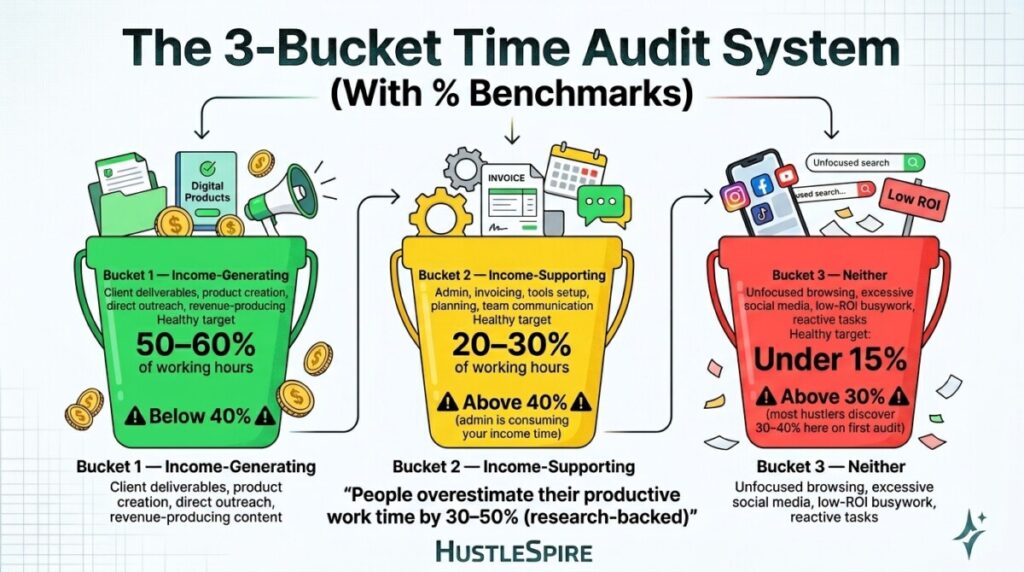
The weekly time audit forces a specific question: for every hour you spent this week, what was the measurable output? Not effort. Output. A client email has been sent. A product is listed. A piece of content has been published. An invoice has been paid. When you categorize your hours by output type — income-generating, income-supporting, and neither — most hustlers discover that 30–40% of their “working” hours fall into the third category. That’s not a motivational problem. It’s an information problem. And the audit solves it in about 20 minutes per week.
How to Run a Weekly Time Audit That Actually Changes Your Behavior
Step 1: Track time in real-time for one full week — not from memory.
Retroactive time tracking is almost useless. Human memory is notoriously bad at recalling how long things actually took, consistently underestimating time spent on low-value tasks and overestimating time on high-value ones. Use a free tool like Toggl Track (free for individuals) to log your time as it happens—start a timer when you begin a task, stop it when you finish. After one week, you’ll have objective data instead of guesses. One freelancer I know discovered she was spending 11 hours per week on social media engagement that generated zero direct revenue — and zero indirect leads she could trace. She cut it to 3 hours and redirected the rest to direct outreach. Her monthly income increased by $800 in 60 days.
Productivity systems only work when you understand where your time is actually going. That’s why the idea in The 5-Minute Productivity System That Replaced My Entire Task Manager becomes even more powerful when paired with a weekly review.

Step 2: Categorize every hour into one of three buckets.
After your tracking week, sort every logged activity into: Income-generating (work clients pay for, products being built, direct outreach), Income-supporting (admin, invoicing, tools management, planning), and Neither (unfocused browsing, excessive social consumption, low-ROI busywork). Your income-generating hours should represent at least 50–60% of your working time. If they’re below 40%, your audit has just identified the exact reason you’re not hitting your income targets. This framework pairs directly with the revenue goal backwards method—your daily action targets only matter if you’re actually spending time on them.
Step 3: Calculate your effective hourly rate — then use it to make decisions.
Divide your total income for the week by your total income-generating hours only. If you earned $400 and spent 8 genuine income-generating hours, your effective rate is $50/hour. Now ask: Is the task you’re considering worth $50/hour of your time? Setting up a complicated email automation from scratch probably isn’t. Writing a client proposal absolutely is. This single number changes how you evaluate every task. Tools like Clockify (free) can calculate this automatically if you tag projects by revenue source.
Step 4: Use the audit to build a protected schedule for your best hours.
Your audit will reveal when your income-generating work actually happens. Most people have a 2–4 hour peak focus window—typically in the morning—where they do their best work. Everything else fills around it. Once you know your pattern, protect that window aggressively: no meetings, no admin, no social media. Block it in your calendar using Google Calendar or any scheduling tool, label it “deep work,” and treat it as immovable. Hustlers who track and protect their peak productivity hours consistently report 20–35% more output from the same number of working hours—without working longer.
The First Audit Is Always Uncomfortable
Your first weekly time audit will probably show something you don’t want to see. Most people discover they’re working significantly fewer genuinely productive hours than they believed—often 3–4 truly focused hours in a day that felt like 8. That’s not a character flaw. It’s normal, and it’s fixable.
The discomfort is the point. You can’t optimize what you can’t see. Expect the first two weeks of auditing to feel exposing. By week three, you’ll start making real-time decisions based on your data—stopping yourself mid-task and asking, “Is this income-generating?” That behavioral shift is where the audit pays off.
A time audit also helps you discover which skills and activities truly create value. That deeper realization is explored in Your Most Valuable Skill Is Buried (And Worth Way More Than You Think).

Download Toggl and Track
Install Toggl Track on your phone and desktop right now — it’s free, takes three minutes to set up, and requires no complex configuration. Create three project labels: “Income-Generating,” “Income-Supporting,” and “Admin/Other.” Start tracking every task this week without changing your behavior — just observe. At the end of Sunday, run the weekly report, calculate your three-bucket breakdown, and identify your single biggest time drain. Then grab the free weekly time audit template to structure your review and make it a consistent Sunday habit from here forward.
