

Adobe Premiere Pro is the industry standard. It’s also $59.99/month as part of Creative Cloud — and for a solo content creator or freelance video editor just building their income stream, that’s a significant overhead commitment before you’ve made a single dollar. The Descript vs. Adobe debate isn’t really about which tool is more powerful. It’s about which tool is appropriate for where you are right now — and for most hustlers starting out in 2026, those are two very different answers.
What Budget Creators Misunderstand About “Professional” Editing Software
The assumption is that professional output requires professional-grade software. That’s partially true for long-form, cinematic video work. It’s largely false for the content types that actually generate income for most solo creators — YouTube videos, podcast episodes, course content, client explainer videos, and social clips.
Most of that content doesn’t need color grading pipelines, multi-cam sync, or advanced motion graphics. It needs clean cuts, clear audio, accurate captions, and fast turnaround. Paying $60/month for capabilities you’ll use 10% of is a poor ROI decision at the start of any content-based side hustle. The tool that fits your actual workflow beats the tool with the longest feature list every time.
Descript vs. Adobe Premiere: What Each Tool Actually Does Best
Descript is built for speed, not complexity.
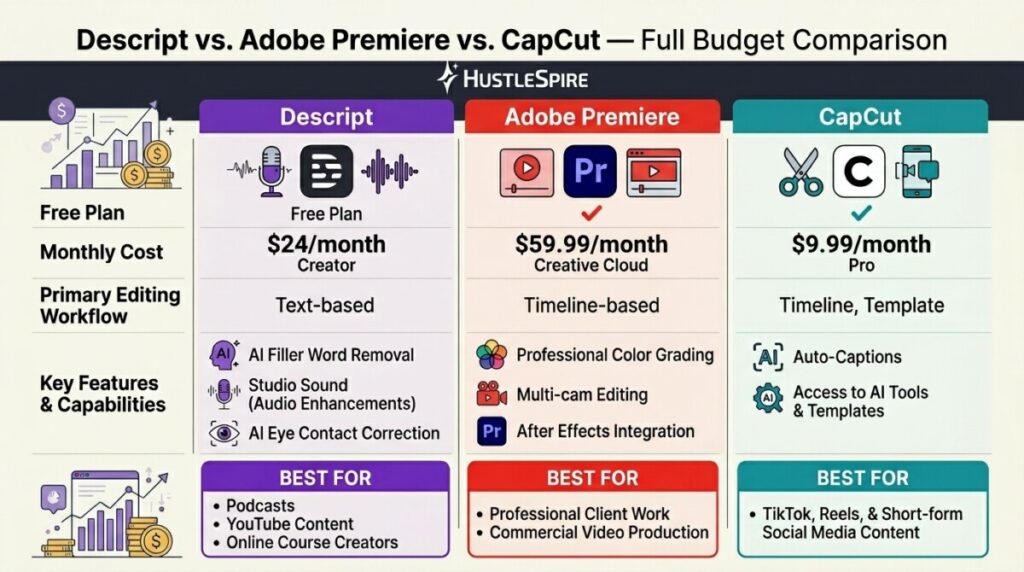
Descript’s core innovation is text-based editing — you edit video by editing the auto-generated transcript, which removes the need to scrub timelines manually. Delete a word in the transcript, that section disappears from the video. For podcast editing, talking-head YouTube content, and course recordings, this cuts editing time by 40–60% compared to traditional timeline editing. The Hobbyist plan is free with limited exports; the Creator plan runs $24/month and includes unlimited transcription, screen recording, and AI-powered filler word removal. For solo creators producing regular content, that’s the sweet spot.
Adobe Premiere Pro is built for control, not convenience.
Adobe Premiere gives you granular control over every element of your edit — color, audio mixing, effects, multi-track timelines, dynamic link with After Effects. If you’re editing client work at a commercial level, producing short films, or building a freelance video editing business where clients expect broadcast-quality deliverables, Premiere’s capabilities justify the cost. The $59.99/month Creative Cloud subscription includes Premiere, After Effects, Audition, and the full Adobe suite — which changes the value calculation if you’re actively using three or more of those tools.
The middle ground option worth considering: CapCut Pro.
CapCut has quietly become a serious contender for creators focused on short-form content. The free plan is genuinely capable — auto-captions, templates, basic AI tools — and the Pro plan runs $9.99/month. For TikTok and Instagram Reels-focused creators, CapCut’s output-to-effort ratio is hard to beat. It doesn’t replace Descript for long-form or Premiere for client work, but it fills a specific niche at a fraction of the cost.

Where Descript wins outright for most HustleSpire readers.
The pattern among content-focused side hustlers is consistent: creators who switch from Premiere to Descript for solo content production report spending less time editing, publishing more consistently, and not missing the features they gave up. Descript’s AI tools—filler word removal, Studio Sound audio enhancement, and eye contact correction—address the specific friction points in solo creator workflows. Those features exist in Premiere only through third-party plugins at additional cost.
Editing is also a major factor in content quality, especially for video creators trying to grow online. In fact, Why Most YouTube Channels Grow Slowly breaks down how weak editing, slow production workflows, and inconsistent output quietly hold many channels back.
When Each Tool Stops
Descript’s limitations become real when you need multi-cam editing, advanced color work, or client-level delivery formats. The text-based editing model also has a ceiling — complex narrative edits or heavily b-roll-driven content still require timeline thinking that Descript doesn’t fully support. Adobe Premiere, on the other hand, stops making sense when your content output is primarily solo talking-head or audio-driven video and you’re spending $720/year for tools you’re not using. Additionally, Premiere’s learning curve is steeper — expect 20–40 hours before you’re editing efficiently.

Download Descript’s free plan today and import one piece of content you’ve already recorded — a voice memo, a screen recording, anything. Run the auto-transcription, make three edits by deleting text, and export the result. That 20-minute test will tell you whether text-based editing fits how you think. If it does, the $24/month Creator plan pays for itself the first time it saves you two hours of timeline scrubbing.
Many creators comparing editing tools are also looking for ways to streamline their workflow completely. That’s exactly why The Best AI Tools to Automate Your Hustle explores powerful tools that can automate repetitive work and free up hours in your creative process.
