

Most productivity advice focuses on apps — but the tools living inside your browser are where real daily efficiency either happens or doesn’t. The right browser extension stack eliminates the micro-friction of switching tabs, retyping information, and manually tracking what you’re doing online. The wrong stack — too many extensions running simultaneously — slows your browser down by 10–25% and creates its own noise. Eight extensions, chosen deliberately, is the number that covers every core workflow need without turning your browser into a resource hog.
Why Most Hustlers Have the Wrong Extensions Installed
Most people install browser extensions reactively — they see a recommendation, add it, and forget it’s there. The result is a toolbar cluttered with 15–20 extensions, half of which haven’t been clicked in six months.
The problem isn’t the individual tools. It’s the absence of a system. Extensions should map to specific workflow needs: research, writing, time tracking, password management, tab control, and outreach. When every extension has a defined job, you use it. When extensions are installed out of curiosity and never configured, they run in the background, consuming memory and occasionally harvesting data they don’t need. Several high-profile Chrome extension security incidents in 2023–2024 involved abandoned or acquired extensions that quietly turned malicious after ownership changed. Review your installed extensions annually and remove anything you can’t explain in one sentence.
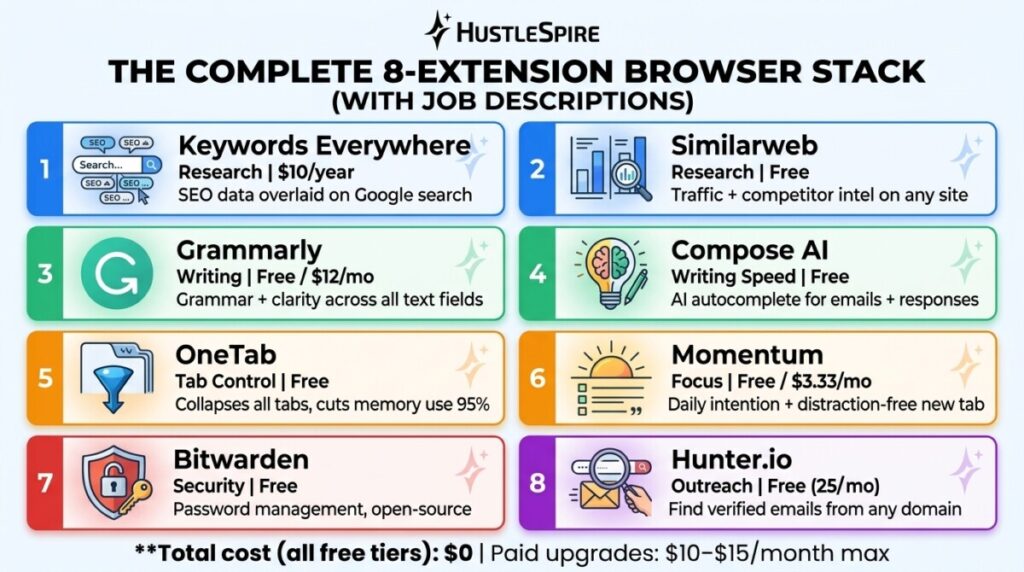
The 8-Extension Browser Stack for Digital Entrepreneurs
Extensions 1–2: Research and content intelligence.
Keywords Everywhere ($10/year for 100,000 credits) overlays search volume, competition data, and related keyword suggestions directly onto Google search results pages—no separate SEO tool tab required. For content creators, print-on-demand sellers doing niche research, or anyone building SEO-driven side hustle content, this replaces a $99/month tool for most basic research needs.
Pair it with Similarweb (free tier) for instant traffic estimates on any website you visit. Researching a competitor’s platform, a potential affiliate partner, or a marketplace you’re considering? Similarweb shows you monthly visit estimates, traffic sources, and geographic breakdown without leaving the page.
Many entrepreneurs start by offering simple services before building bigger digital systems around them. That early strategy is explained in Why Your First $1,000 Should Come From Services, Not Products.

Extensions 3–4: Writing quality and speed.
Grammarly (free tier) runs grammar and clarity checks across every text field in your browser—emails, client proposals, social posts, and platform listings. The free version catches the mistakes that matter. The paid version ($12/month) adds tone suggestions and clarity scoring, which is useful for client-facing copy but not essential at the start.
Pair it with Compose AI (free)—an AI autocomplete extension that learns your writing patterns and suggests completions as you type. For freelancers writing repetitive client emails or standard responses, Compose AI cuts drafting time by an estimated 30–40% on templated communication.
Extensions 5–6: Tab management and focus.
OneTab (free) converts all your open tabs into a single list with one click, reducing memory usage by up to 95% according to the extension’s own benchmarks. One hustler I know was running 40+ tabs across three research sessions simultaneously—OneTab let him collapse them into dated lists he could reopen by project. Momentum (free, with paid Plus at $3.33/month) replaces your new tab page with a focus dashboard: one daily intention, a to-do widget, and a distraction-free environment that keeps your primary goal visible every time you open a tab.
Extensions 7–8: Security and outreach efficiency.
Bitwarden (free) is the open-source password manager that security researchers consistently recommend over LastPass since LastPass’s 2022 data breach. It stores unlimited passwords, generates strong credentials, and autofills across every site—for free, with no meaningful feature limits on the individual plan.
For outreach, Hunter.io (free tier: 25 searches/month) finds verified email addresses for any domain directly from your browser. For freelancers doing direct client outreach as part of a freelance income strategy, Hunter removes the manual research step that kills cold outreach momentum.
More Extensions Means More Risk
Every extension you install gets permission to read and modify data on websites you visit — some ask for access to everything. Before installing any extension, check the permissions it requests and read recent reviews for any reports of changed behavior after ownership transfers. Stick to extensions with 100,000+ active users and a recent update history.
Also worth noting: browser extensions are Chrome-centric. Firefox users can access most of these, but Keywords Everywhere and a few others have slightly reduced functionality outside Chrome. Safari users face the most limitations — several extensions in this stack have no Safari equivalent. If you’re building a lean productivity tool stack, browser choice affects your extension options more than most people account for.
As those systems grow, the tools you use begin to matter more. Some of the most powerful ones are highlighted in 50 Tools That Turned My Side Hustle Into a $15K/Month Business (Bookmarked by 100K People).

Audit Before You Add
Before installing anything new, open your browser’s extension manager right now (Chrome: chrome://extensions). Count how many you have. Disable any you haven’t used in 30 days. Then install from this list in order of your most pressing workflow need — research, writing, or outreach. Adding all eight at once defeats the purpose. Pick two that address your biggest current friction point, configure them properly, and use them for two weeks before adding more. That’s how a tool stack compounds over time instead of becoming background noise.
