

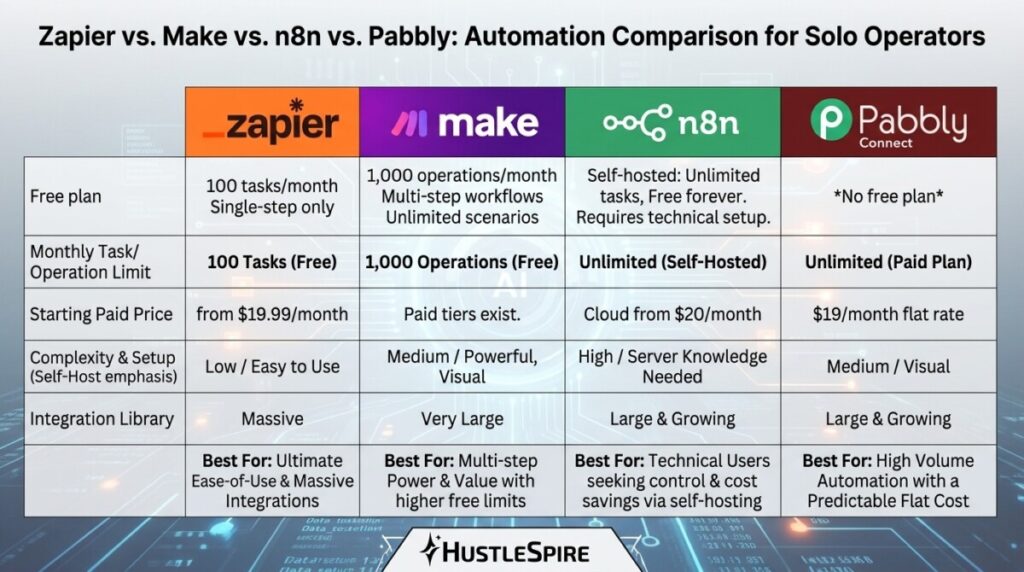
Zapier is excellent. It’s also $19.99/month minimum once you outgrow the free tier’s 100-task limit — and for most solo side hustlers running lean operations, that bill adds up fast. What fewer people know is that Make (formerly Integromat) offers a genuinely capable free Zapier alternative that handles 1,000 operations per month at no cost, supports multi-step workflows, and connects to most of the same apps. The automation gap between paid and free tools is far narrower than the pricing gap suggests.
What People Get Wrong About Automation Tools
The common mistake is assuming the most popular tool is the most necessary one. Zapier dominates search results and content marketing, which creates a perception that it’s the only serious option. It isn’t.
Most side hustlers need automation for a small set of recurring tasks: routing form submissions to a spreadsheet, sending a notification when a payment lands, adding new email subscribers to a CRM, or posting content across platforms on a schedule. None of these workflows require Zapier’s premium infrastructure. They require a basic if-this-then-that logic that several free tools handle cleanly.
The automation tool that pays for itself is the one that fits your task volume and budget — not the one with the biggest brand name.
Free Zapier Alternatives That Actually Deliver
Make (formerly Integromat) — the strongest free tier available.
Make’s free plan includes 1,000 operations/month and unlimited active scenarios (their term for workflows). The visual workflow builder uses a drag-and-drop canvas that shows your automation as a connected flow rather than a linear list of steps — which makes complex, multi-branch logic significantly easier to build and debug. Zapier’s free plan caps at 100 tasks/month and restricts you to single-step Zaps. For anyone running more than a handful of automations, Make’s free plan covers considerably more ground before you hit a paywall.

n8n — the free option for those comfortable with slightly more setup.
n8n is an open-source workflow automation tool that you can self-host entirely free, or use their cloud plan starting at $20/month. The self-hosted version has zero task limits and connects to 400+ apps. It requires slightly more technical comfort than Make or Zapier — you’re deploying it yourself — but for developers or technically-minded hustlers, it’s the most cost-effective automation stack available at any scale. Workflows that would cost $100+/month on Zapier run free on a self-hosted n8n instance.
Pabbly Connect — the flat-rate option worth knowing.
Pabbly Connect isn’t free, but its pricing model deserves mention here because it breaks the per-task billing structure entirely. One flat fee of $19/month covers unlimited workflows and unlimited tasks — no caps, no overage charges. For side hustlers whose automation needs are growing but unpredictable month to month, Pabbly’s model removes the anxiety of watching your task counter. It’s a direct alternative to Zapier’s Professional plan at a fraction of the escalating cost.
Tools like this are part of a much bigger shift happening online right now. In fact, The AI Money Method That’s Working Right Now (Before Everyone Catches On) breaks down how people are using simple AI workflows to build real income streams.
Where to start: map your actual automations first.
Before choosing any tool, write down the five repetitive tasks you do manually every week. Specifically. “Send a Slack message when a new Typeform response comes in.” “Add a row to Google Sheets when a Gumroad sale completes.” Once you have those written, check whether Make’s free tier covers all five. For most solo operators running one or two income streams, it will.
Where Free Automation Tools Fall Short
Make’s free plan resets monthly—unused operations don’t roll over, and hitting the 1,000 limit mid-month pauses your active scenarios until the reset. For high-volume operations like e-commerce order processing or large email list triggers, the free tier won’t hold. Additionally, Make’s learning curve is steeper than Zapier’s — the visual canvas is powerful, but it takes longer to build your first workflow confidently. Expect 30-60 minutes of setup time before your first automation runs cleanly. That’s an investment worth making, but not one to underestimate.

Go to Make’s free plan and create an account today — no credit card required. Pick one manual task you repeat at least three times per week and build a single scenario around it. The platform has pre-built templates for the most common workflows: Google Sheets, Gmail, Slack, Airtable, Notion. Use a template for your first build rather than starting from scratch. One working automation this week saves you hours next month.
Automation isn’t just useful for workflows and integrations. It’s also helping freelancers move faster in places like Fiverr — something explored in The AI Tool That Writes Your Fiverr Proposals in 30 Seconds (Free Version Included).
