
You’re not losing time to big distractions. You’re losing it to the small ones—switching apps, hunting for files, retyping the same snippets, and clicking through menus you’ve navigated 400 times. Researchers at the University of California, Irvine, found it takes over 23 minutes to fully refocus after an interruption. The Raycast vs. Alfred debate isn’t about which app looks prettier. It’s about which one quietly eliminates the friction that’s stealing hours from your workday.
What Most People Get Wrong About Productivity Launchers
Most people download a launcher, use it to open apps faster, and call it done. That’s like buying a Swiss Army knife and only using it to open soda cans.
The real value isn’t app launching — it’s workflow automation. Clipboard history, text expansion, window management, API integrations, and custom scripts. When you actually build those systems, you stop doing repetitive work manually. One freelancer I know cut his client onboarding process from 45 minutes to 11 by building a single Raycast workflow that auto-generates contracts, opens his invoicing tool, and pastes a welcome email template—all with one keystroke.
That’s not a productivity hack. That’s recovered billable time.
Many creators rely on productivity tools to manage the digital systems they build. This is especially helpful for people creating systems like those discussed in The Notion Template Side Hustle: $2K/Month Selling What You Already Built.
Raycast vs. Alfred: An Honest Head-to-Head Breakdown
Point 1: Price and accessibility favor Raycast — with a caveat.
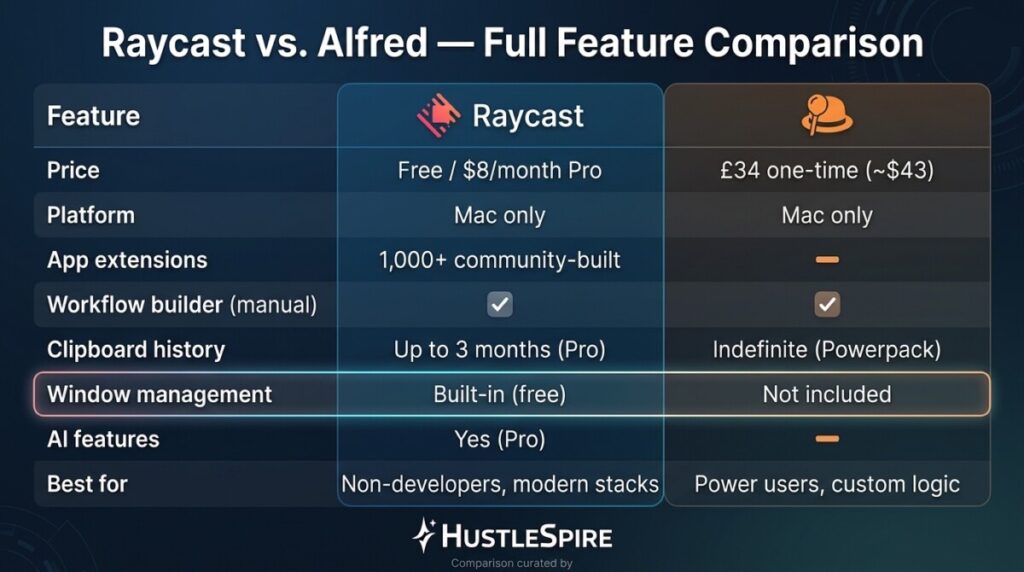
Raycast is free for individuals. Its Pro plan runs $8/month and adds AI features, cloud sync, and team sharing. Alfred costs a one-time £34 (~$43 USD) for the Powerpack, which unlocks its full workflow engine. If you’re a solo entrepreneur testing the waters, Raycast’s free tier is genuinely powerful — not a crippled demo. However, Alfred’s one-time cost beats Raycast Pro over 5+ months of use, purely on math.
Point 2: Raycast wins on modern integrations; Alfred wins on raw customization depth.
Raycast has 1,000+ extensions in its store covering tools like Notion, Linear, GitHub, Figma, and Slack—most built by the community and free. You can search your Notion database, create GitHub issues, or check your calendar without touching your mouse. Alfred’s workflows are more powerful under the hood—you can build complex conditional logic—but require more technical setup. For non-developers, Raycast’s extension library gets you 80% of the way there in 20 minutes.

Point 3: Clipboard history alone justifies installing either tool today.
Both apps offer persistent clipboard history—Raycast stores up to 3 months (Pro); Alfred stores indefinitely with Powerpack. If you regularly copy/paste between documents, client briefs, or code snippets, this feature alone recovers 15–20 minutes daily for most knowledge workers. Combined with text expansion (type “;; email” → your full email signature auto-fills), the time savings compound fast.
Point 4: Window management is where Raycast pulls ahead for most users.
Raycast’s built-in window management replaces tools like Magnet or Rectangle — both of which cost $8–$10 separately. Alfred doesn’t touch window management. For someone building a lean productivity stack, consolidating three paid tools into one free app is a real operational win.
What These Tools Won’t Fix
Neither Raycast nor Alfred will save you if your actual workflow is broken. They’re force multipliers — they make efficient systems faster, not chaotic ones organized.
Also worth noting: both are Mac-only. Windows users need to look at PowerToys (free, from Microsoft) or Keypirinha for comparable functionality. Raycast’s AI features, while impressive, aren’t worth the $8/month upgrade until you’ve maxed out the free tier — which takes most users 2–3 months to do.
Setup time is real. Budget 2–3 hours to configure extensions, shortcuts, and snippets properly. After that, the tool mostly runs itself.
Efficient tools also help entrepreneurs focus on the work that actually matters. That same idea is explored in Why Successful Side Hustlers Never Work Hard (They Do This Instead).

20 Minutes to a Faster Workflow
Download Raycast right now — it’s free and takes 3 minutes to install. Then do one thing: set up five text expansion snippets for phrases you type daily (your email, your standard reply to client inquiries, and your invoicing link). Time yourself before and after for one week. That single feature alone will show you exactly how much time you’ve been bleeding on repetitive typing—and make the case for going deeper into Mac productivity automation.
